Need to migrate to Joomla! 4? You'll need MigrateMe 4 instead - click here to access

  • Migrate all your data
  • Migrate your extensions
  • Migration success guaranteed
  • Avoid down-time
  • Dedicated support
  • Money back guarantee

Migrate Me Plus is smart.

If you're like me, you like it when things just work.

And that's why I developed Migrate Me Plus to be incredibly easy to use.

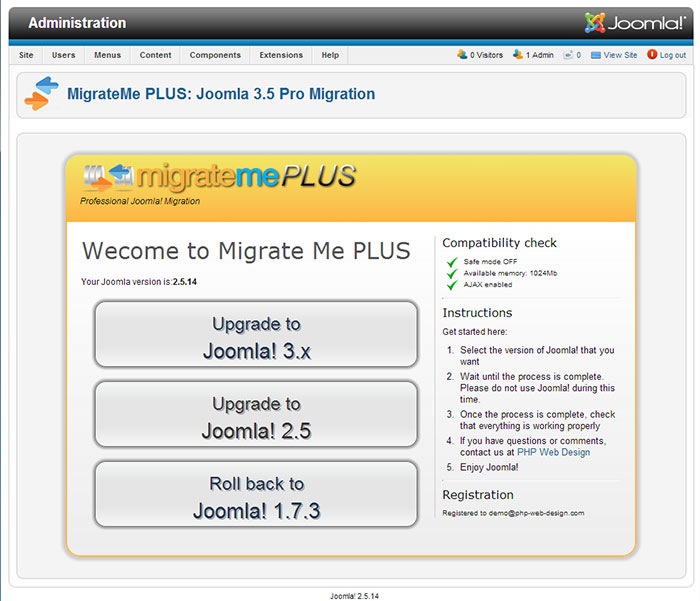
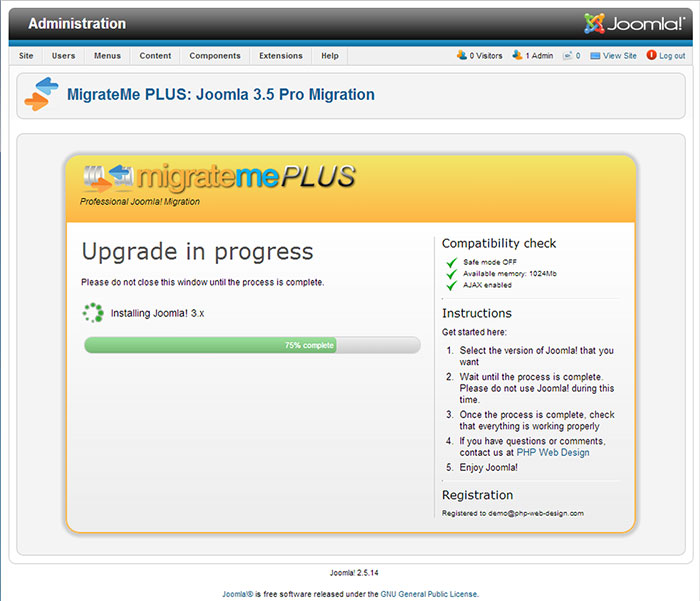
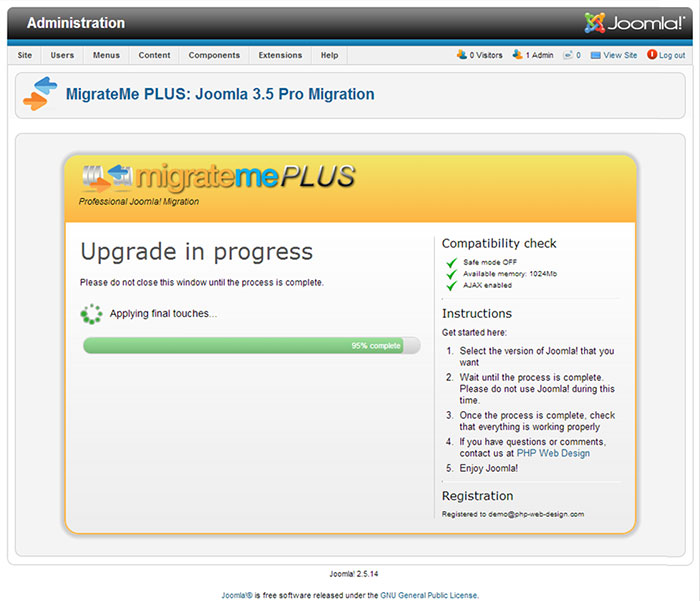
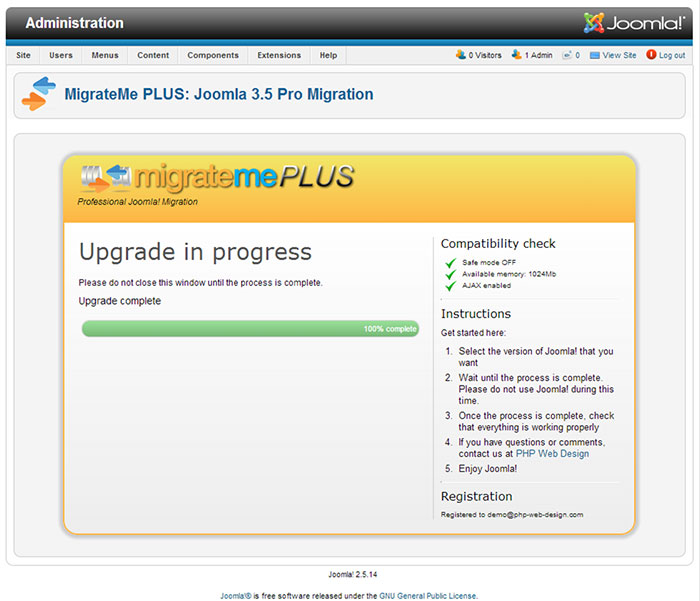
Just click a single button to start the migration, and Migrate Me Plus takes care of the rest. It runs thousands of calculations and hundreds of individual processes to make sure your Joomla system is perfectly upgraded.

By deploying a powerful staging environment, it avoids any impact on your live site, and lets you test the upgrade without any impact on your website's users.

A smart sensor detects incompatible plugins and automatically prevents errors like the dreaded 'white screen of death'.


Watch the video to see just how simple Migrate Me Plus is to use.

Why buy Migrate Me Plus

Migrate Me Plus is more than just software. It's a guarantee that your system will migrate successfully – from Joomla 1.6, 1.7 or 2.5 to Joomla 3.x. Migrate Me Plus is far more powerful and intuitive than any other method of upgrading – it eradicates any risk of migration not working, or the upgrade introducing problems to your system.

And for your complete peace of mind, your purchase entitles you to full support – just let us know if you need anything, and you'll experience the award-winning, customer-first assistance that we're known for!

  • Guaranteed migration to Joomla 3.x
  • Purchase includes dedicated support
  • All third-party extensions are supported
  • Avoid problems with incompatible extensions
  • All your original images and files are migrated
  • Migration is staged to avoid all impact to your live site
  • 100% satisfaction guaranteed
  • No break in any functionality or links
  • Google PageRank completely unaffected
  • Test the upgrade thoroughly before making it live
  • Full User Guide and documentation available
  • Automatic backups and roll-back functionality included

What our clients say...

Migrate Me Plus has been used on thousands of systems, and a few people have been kind enough to write reviews. Here is a small selection — for more (or to write your own review) click here.

"Simply Brilliant"

Migrate Me Plus promises to migrate your old J2.x site to J3.x with the minimum of fuss and effort. It does that with ease! Worth every penny.

– Dave

"Great work"

The extension does what it promises. One click after installation and migration is as easy as a kids play. Migration in few minutes – saves you time and nerves.

– Monika Matzdorf

"Outstanding Extension"

The easiest extension I have ever used and worth several times the price! The peace of mind that comes with this extension is second to none.

– Jennie Frizelle

"Amazing Extension! A must have for migration"

An incredibly well thought out and built extension. The purpose I intended to use it for was only a small part of what I found it could do. Amazing value for money. Time = Money and this will save you days of your time. Just Brilliant!

– Paul

"Outstanding Joomla Migration Tool"

Easy to install, one-click Joomla! migration in minutes – worked like a dream for upgrades from 1.7 → 2.5 & 3.x... 100% value for money – potentially saved me hours of pain! A+ Component!

– Toby

"Does exactly what it says."

Does exactly as described. Hit the button and you're ready... Best in business... Really superb value for money.

– Guy

"Does what its name promises – without worries"

Just read the instruction and you need no more info from any other Joomla sites. Worth every cent.

– Sefan Fey

"Best way to upgrade!"

Very satisfied with the component and the support. This component may save you hours of aggravation. Simply the best way to upgrade!

– Intellicode

"Excellent Extension with 1st Class Support"

I thoroughly recommend Migrate Me Plus, it has made the migration from Joomla 2.5 to 3.3 a straightforward process.

– Keith Johnson

"So happy this works... even with GoDaddy! Thank you!"

I created a dummy site with many extensions and love that this tool FINISHES the installation and lets you fix the little things! Major kudos to the developer for making it so EASY!! I didn't look at any guides!

– Web Dude

"Best Joomla extension there is!"

It works like a charm! Updating across Joomla systems used to be such a chore, but this extension makes the whole process so easy. Takes hours, even days, away from the migration process. Best extension for Joomla. FACT.

– Nicol J Craig

"Excellent functionality for the money – Bargain"

"One button click" says it all. My parents taught me "You get what you pay for". This product qualifies and I consider it a bargain.

– Dave Grenn

Screenshots

Buy Migrate Me Plus

Buy Migrate Me Plus and experience it for yourself! All options include full support and a money back satisfaction guarantee

SILVER Edition

  • Includes all features
  • 3 months full support
  • 3 months updates
  • Support and updates for 1 domain
  • GPL v3 License
  • Upgrade from Joomla 1.6, 1.7, 2.5 or 3.x
  • Upgrade to the latest version of Joomla 3.x
  • Guaranteed migration success
  • Upgrade guaranteed to other Joomla 3.x systems released within next 3 months
 

ONLY £49.00


PayPal - The safer, easier way to pay online.


GOLD Edition

  • Includes all features
  • 1 YEAR full support
  • 1 YEAR updates
  • Support and updates for UNLIMITED domains
  • GPL v3 License
  • Upgrade from Joomla 1.6, 1.7, 2.5 or 3.x
  • Upgrade to the latest version of Joomla 3.x
  • Guaranteed migration success
  • Upgrade guaranteed to other Joomla 3.x systems released within next 3 months
 

ONLY £69.00


PayPal - The safer, easier way to pay online.


Add comment

Submit

Comments

0
Jodie McPhee
10 years ago
5

I love Migrate Me Plus! This software has worked successfully for me on several of my sites, it's like magic! And Barnaby, thank you for making it and answering all my questions so quickly. This is truly the best software I have ever used. So easy, so fantastic!

Like Like Reply | Reply with quote | Quote | Report comment
0
Barnaby Dixon
10 years ago
Reply to Jodie McPhee

Thanks Jodie, you are awesome!

Like Like Reply | Reply with quote | Quote | Report comment
0
George Cristian MATEI
10 years ago
3

Does it works for multilanguage sites from 1.5 to 3.4 ?

Like Like Reply | Reply with quote | Quote | Report comment
0
Barnaby Dixon
10 years ago
Reply to George Cristian MATEI

Hi there George,


Thank you for getting in touch. Yes it does :-)


All the best, Barnaby Dixon

Like Like Reply | Reply with quote | Quote | Report comment
0
Qpidity
10 years ago
4

Hi,


I've run into an issue with the migration of a second site, from 2.5 to 3.x The migration process completed and all seemed well and so i started going through upgrading all extensions. I upgraded sh404sef and when I tried to access the component I got a message that I needed to activate the plugin. After activating the plugin a got an error message:


Fatal error: Class 'ShlSystem_Log' not found in /public_html/2016update/mmp_upgrade/plugins/system/sh404sef/sh404sef.php on line 42 which is this:


line 42: ShlSystem_Log::error('sh404sef', $msg);


Now I can't access Joomla administrator at all.


Can you please advise how I resolve this?


Thanks in advance

Like Like Reply | Reply with quote | Quote | Report comment
0
Barnaby Dixon
10 years ago
Reply to Qpidity

Hi again,


The SH404Sef error is a strange one. I haven't been able to find any related problems when searching on Google, so it would suggest it's a local issue - perhaps an incompatibility with the package itself, or with the local server. I would suggest: please redownload the latest package from the SH404Sef team, to iron out any possible problems with the package. And then uninstall completely the SH404Sef extension - and check in the Extension Manager to ensure it's all gone. Then reinstall the latest package again. Hopefully if there are any issues there it should correct them. If not, please send me a login and I'll take a look for you


The Osmap issue is fortunately very straight-forward: it's just a coding notice to say that a variable hasn't been declared before it's been used. This is more like feedback for a developer rather than an error message. You can avoid notices like this if you open System > Global Configuration and reduce Error Reporting to System Default.


I hope that helps - please let me know if I can help further in any way. Barnaby Dixon

Like Like Reply | Reply with quote | Quote | Report comment
0
Qpidity
10 years ago
Reply to Qpidity

Additional problems, this time with another extension -OsMap. When I go to Components > OsMap I get:


Notice: Undefined property: stdClass::$debug_osmap in 2016update/mmp_upgrade/administrator/components/com_osmap/views/sitemaps/tmpl/default.php on line 178, which is:

Like Like Reply | Reply with quote | Quote | Report comment
0
Qpidity
10 years ago
Reply to Qpidity

Hi,


Thanks for your reply. I did as suggested, renamed the directory and reinstalled the component. I noticed a new directory created when I reinstalled but when I went to activate the system plugin once again I got the same error:


Fatal error: Class 'ShlSystem_Log' not found in 2016update/mmp_upgrade/plugins/system/sh404sef/sh404sef.php on line 42

Like Like Reply | Reply with quote | Quote | Report comment
0
Barnaby Dixon
10 years ago
Reply to Qpidity

Hi there


I am guessing the plugin you activated was related to the old version of SH404Sef.


The way forward is to first disable this plugin. You can do so by simply opening /plugins/system/sh404sef in FTP and renaming the directory to sh404sef_disabled or something similar.


Then your admin should load ok. You can then reinstall SH404Sef (again), and it should do the trick.


All the best, Barnaby Dixon

Like Like Reply | Reply with quote | Quote | Report comment
0
tushar
10 years ago
5

hi

i have a joomla 1.5 site can i migrate in latest version and what about expired plugins because some plugins is no more in this site.

Like Like Reply | Reply with quote | Quote | Report comment
0
Barnaby Dixon
10 years ago
Reply to tushar

Hi there Tushar


To migrate Joomla 1.5 you need MigrateMe (not Plus) available here: https://www.php-web-design.com/Joomla-Components/migrate-me-professional-joomla-3-0-migration.html


This will migrate all your existing content, settings, data, and other information.


You will need to install the latest Joomla 3 version of each extension. If you have plugins that are no longer available for Joomla 3, you will need to find different plugins to do the same task, on the Joomla Extension Database


I hope that helps, please let me know if you have any other questions or if I can help further in any way.


All the best, Barnaby Dixon

Like Like Reply | Reply with quote | Quote | Report comment
0
Damir Hamberger
10 years ago
5

Two years ago I was working with Migrate Me, today with Migrate Me plus. This time I had more than hundred menuitems and several hundreds of K2 items. As you can see, I survived migration from J!2.5 to J!3.5 only because of Migrate Me Plus. If there was no such a nice extension, I think that I'll need more than a lifetime to upgrade...

Author is a great guy, and his support is above al lexpectations. He was like that two years ago, and he is still the same.

Bravo!

Like Like Reply | Reply with quote | Quote | Report comment
0
Barnaby Dixon
10 years ago
Reply to Damir Hamberger

Amazing feedback, thank you Damir

Like Like Reply | Reply with quote | Quote | Report comment
0
Bethany
10 years ago
5

My upgrade went beautifully! Thank you for the great product and documentation.


Thank you!

Like Like Reply | Reply with quote | Quote | Report comment
0
Barnaby Dixon
10 years ago
Reply to Bethany

Hi Bethany,


Great! I'm glad it's gone well for you.


If you used the Go Live functionality in MigrateMe Plus, then yes you can safely remove the mmp_upgrade directory using Filezilla if you like. It sounds like your server has some sort of permissions issue so isn't allowing the directory to be removed automatically.


All the best, Barnaby Dixon

Like Like Reply | Reply with quote | Quote | Report comment
0
Iwona
10 years ago
5

Hi there,


I've run into an issue with the migration of my site from 2.5 to 3.5. Before to start I upgraded my Template and Modules to the newer versions. The migration process was performed on local computer and when completed all seemed well. The site and template functions well. However, I remarked that I have no access to the particular administrator menu of my joomla site: i.e. Extensions >> Manage (Install, Manage, Database etc.)

I get an error: 404 Component not found.


I tried to find a solution to this but without any success. I am able to access my other backend menu (System, Menus, Content, Components etc.) but not this one.


Can you please advise me how I resolve this?

Thank you in advance

Like Like Reply | Reply with quote | Quote | Report comment
0
Barnaby Dixon
10 years ago
Reply to Iwona

Hello Iwona,


Thank you for getting in touch. I'm not sure exactly what the issue is here. Are you able to access administrator/index.php?option=com_installer if you enter the url directly into your browser?


It's quite unusual that the other bits of the admin would work well, but the extensions manager doesn't work. If the above trick doesn't help, please let me know a good time to run a TeamViewer session and I'll take a look for you


All the best, Barnaby Dixon

Like Like Reply | Reply with quote | Quote | Report comment
0
Valeria Milani
10 years ago
5

If I buy the plugin and I can not do the migration from Joomla 1.5 to Joomla 3 for K2 and Kunena components, it is expected to support?

Like Like Reply | Reply with quote | Quote | Report comment
0
Barnaby Dixon
10 years ago
Reply to Valeria Milani

Hi there,


Yes of course :-)


I offer full support and successful migration is guaranteed


All the best, Barnaby Dixon

Like Like Reply | Reply with quote | Quote | Report comment
0
francesco andreani
9 years ago
3

Hello i'm writing a pre-sale question. just to know more details because i'm very new to joomla. I have a 2.5 version in production and I have to migrate to the 3.6. I have made my migration in a test environment but a custom component written by a company that is no more active doesen't work. I would like to kmow if i have to install the MigrateMe in the 3.x version or in the production 2.5 version, I would like to know if I can purchase a support in case this component can not be migrated.

Thank you so moutch


francesco

Like Like Reply | Reply with quote | Quote | Report comment
0
Barnaby Dixon
9 years ago
Reply to francesco andreani

Hi there,


Thank you for your question.


MigrateMe Plus would be installed on Joomla 2.5. And yes, support is completely included in the purchase of MigrateMe Plus. If you need any help at all just let me know!


As far as your third party extension is concerned, please note that your extension would need to be updated to be Joomla 3 compatible. I can take care of this for you if you like, but it would cost extra. If you'd like me to send a quote, please email me a copy of the extension and I will take a look for you


Thanks & all the best,

Barnaby Dixon

Like Like Reply | Reply with quote | Quote | Report comment
0
JImmy
9 years ago
5

Hey,

this is more of a pre sales question and maybe its been answered before. I have two sites that i want to migrate to J3.6. However, one is on J1.5 and the other one is J1.6. Do i need to buy both MigrateMe and Migrate Me plus?

Like Like Reply | Reply with quote | Quote | Report comment
0
Barnaby Dixon
9 years ago
Reply to JImmy

Hi there,


Thank you for your message. I am not sure if I missed this question you sent last month (see below) so sending another answer just in case :-)


The answer is: yes you would need both MigrateMe and MigrateMe Plus. The underlying frameworks of Joomla 1.5 and 1.6+ are very different so it needs completely different migration techniques.


I hope that helps!


All the best, Barnaby Dixon

Like Like Reply | Reply with quote | Quote | Report comment
0
Ben
9 years ago
5

Hello,

After upgraading to joomla 3.7 from 3.6.5, My ASMenu module got distorted. The menu bar has reduced to two tabs. Is there anyone who can help me out on this?


Thanks

Like Like Reply | Reply with quote | Quote | Report comment
0
Barnaby Dixon
9 years ago
Reply to Ben

Hello,


Thank you for your message. Please could you send me a message via the Contact Form (or reply directly to this email) with a login to the new system and I will check it out for you. It's most likely to be a minor CSS change from Joomal 3.6.5 to 3.7


Thanks & all the best, Barnaby

Like Like Reply | Reply with quote | Quote | Report comment
0
Patrick
9 years ago
5

Hi,


Does this work for Joomla 1.7.5? I have tried migrating from 1.7.5 to 2.5 in the hope of getting to v3 over the weekend but no luck so far.


Best,

P

Like Like Reply | Reply with quote | Quote | Report comment
0
Barnaby Dixon
9 years ago
Reply to Patrick

Good morning,yes it does work for Joomla 1.7,and successful migration is guaranteed.


All the best, Barnaby Dixon

Like Like Reply | Reply with quote | Quote | Report comment
0
Ervin Wyatt
9 years ago
5

Does this work with joomla users to include settings?


Does this work with K2 items and users?


Can I chose what extensions I want to keep and not bring over the others?


Can I bring the extensions over but not the settings?

Like Like Reply | Reply with quote | Quote | Report comment
0
Barnaby Dixon
9 years ago
Reply to Ervin Wyatt

Hi there,


Yes, all users and configurations are migrated

Yes all K2 data, items and users are migrated

All extensions and data are migrated to Joomla 3.7. You can uninstall extensions after migration if you do not wish to keep them.

All settings are migrated. You can uninstall extensions and then reinstall them post migration if you wish to reset settings and data.


All the best, Barnaby Dixon

Like Like Reply | Reply with quote | Quote | Report comment
0
Lokeraj
9 years ago
5

Hello i have a question i have joomla 1.5.26 install on ipower and i want to migrate and upgrade to 3.X, can this tool help me and do i need to install back new template and menu system etc, how can you help doing this?

Like Like Reply | Reply with quote | Quote | Report comment
0
Barnaby Dixon
9 years ago
Reply to Lokeraj

Hi there,


Thank you for your message. To migrate Joomla 1.5 you will need MigrateMe (not Plus) available from https://www.php-web-design.com/migrate_me/


I hope that helps! All the best, Barnaby Dixon

Like Like Reply | Reply with quote | Quote | Report comment
0
Bembo
9 years ago
5

Hi,


Can this tool help me on upgrading a template? is this included on the upgrading process?


Thanks

Like Like Reply | Reply with quote | Quote | Report comment
0
Barnaby Dixon
9 years ago
Reply to Bembo

Hi there,


You would need to ask your template distributor for the latest Joomla 3 compatible version of your template, usually they will have one available


All the best, Barnaby Dixon

Like Like Reply | Reply with quote | Quote | Report comment
0
Rag
9 years ago
5

Hi there

I want to migrate my website, which is joomla 1.5, to 3.x. I want to keep all URLs because I don't want to lose my rank. Can this extension keep all of them?

(I do not turn Search Engine Friendly URLs on, this is my website: http://thienvanvietnam.org )


Thank you!

Like Like Reply | Reply with quote | Quote | Report comment
0
Barnaby Dixon
9 years ago
Reply to Rag

Hi there Rag,


Thank you for your message.


In general, your original urls will stay the same. However, there are a few differences...


Joomla 3 no longer uses sections. MigrateMe will convert your sections (and links to your sections) to categories, so the url will change slightly here.


Also category IDs are rearranged by Joomla 3, since it reserves several IDs for its own use. This means that in some cases your category IDs will change - but where this happens MigrateMe will update your menu items to point to the new category ID.


I hope that helps!


All the best, Barnaby Dixon

Like Like Reply | Reply with quote | Quote | Report comment
0
pragnesh panchal
9 years ago
2

All content migration successfully,bust some interlinks is not working

i try out reaching with mail but you don't replay


Error : Category not found

Like Like Reply | Reply with quote | Quote | Report comment
0
Barnaby Dixon
9 years ago
Reply to pragnesh panchal

Hello,


I sent a reply, but perhaps you did not see it. The issue is in your htaccess configuration. Please try disabling the SEO urls and the urls should work - pointing to the fact that you'll need to ensure your htaccess is correctly configured to enable SEO urls.


All the best, Barnaby Dixon

Like Like Reply | Reply with quote | Quote | Report comment
0
Philipp
9 years ago
5

Hello,

will your software also work on my german site/server?

second question: will I get a proper invoice?

Best,

Philipp

Like Like Reply | Reply with quote | Quote | Report comment
0
Barnaby Dixon
9 years ago
Reply to Philipp

Hi there Philipp,


Thank you for your message.


Yes the software does work on German sites and servers. There are no language restrictions.


And yes a proper invoice is generated and sent automatically, with my logo and company name and address at the top, as well as your details, and details of the purchase.


All the best, Barnaby Dixon

Like Like Reply | Reply with quote | Quote | Report comment
0
Caro
9 years ago
3

Hi,

I need to know if this plugging migrate all my virtuemart products with images, description, upgrades, and every data in it?

My joomla version is 2.5.8

My virtuemart is 1.1

Thank u

Like Like Reply | Reply with quote | Quote | Report comment
0
Barnaby Dixon
9 years ago
Reply to Caro

Hello,


Thank you for your message.


Yes your data will all be migrated to the new system


All the best, Barnaby Dixon

Like Like Reply | Reply with quote | Quote | Report comment
0
simon
9 years ago
5

Hi will i need to remove any 3rd party extensions or does your product manage the upgrade from start to finish? disabling any incompatible extensions?

Like Like Reply | Reply with quote | Quote | Report comment
0
Barnaby Dixon
9 years ago
Reply to simon

Hi there Simon,


Thank you for your message. You will not need to remove anything - MigrateMe Plus will handle incompatibilities so you have at the least a working Joomla 3 admin area, and you can make all the changes you want.


I hope that helps! All the best, Barnaby Dixon

Like Like Reply | Reply with quote | Quote | Report comment
0
Abdessamad
9 years ago
4

Hi,


Can I migrate my Joomla 1.5 website to 3.5 with all the extenxions and components?

Do I need MigrateMe only, MigrateMePlus only or both. Please reply me asap


Thanks


Abdessamad

Like Like Reply | Reply with quote | Quote | Report comment
0
Barnaby Dixon
9 years ago
Reply to Abdessamad

Hello,


Thank you for your message. To migrate Joomla 1.5 you need MigrateMe, available at https://www.php-web-design.com/migrate_me/


This will take you direct to Joomla 3, so you do not need MigrateMe Plus as well.


All the best, Barnaby Dixon

Like Like Reply | Reply with quote | Quote | Report comment
0
Oscar Chung
8 years ago
3

How this works?

Like Like Reply | Reply with quote | Quote | Report comment
0
Oscar Chung
8 years ago
5

How this works? It works if Joomla has a template in it?

Like Like Reply | Reply with quote | Quote | Report comment
0
Barnaby Dixon
8 years ago
Reply to Oscar Chung

Hi Oscar,


Yes it works if Joomla has a template. You will need to ensure your template is Joomla 3 compatible... many templates already are, and you will also often find the template creator has a Joomla 3 upgrade available.


I hope that helps...


Barnaby Dixon

Like Like Reply | Reply with quote | Quote | Report comment
0
David Buchmueller
8 years ago
5

I am wondering what the process is to update an existing site. I am not migrating just updating in place. Is the software designed to do that?

Like Like Reply | Reply with quote | Quote | Report comment
0
Barnaby Dixon
8 years ago
Reply to David Buchmueller

Hi there David,


Thank you for your message. MigrateMe Plus will upgrade your existing site on the same server... the way it works is it first gives you a temporary upgraded system, where you can check everything is working as it should. Once you're happy with the new system, just click Go Live to make the upgrade 'live'. This extra step is just to help avoid issues where old plugins are not compatible and need to be updated; but the effect is that you're upgrading a new system 'in place' with the ability to preview the update first.


I hope that helps? All the best, Barnaby Dixon

Like Like Reply | Reply with quote | Quote | Report comment
0
Paul Vec
8 years ago
5

Hi barnaby I am really interressted by your product, but can it migrate joomfish multilang data?

Like Like Reply | Reply with quote | Quote | Report comment
0
Barnaby Dixon
8 years ago
Reply to Paul Vec

Hi Paul,


JoomFish was deprecated and is no longer available, but you can use MigrateMe to migrate your old JoomFish data. Then after migration, install Falang, and also install Fish2Falang to complete conversion of your old JoomFish data to Falang.


All the best, Barnaby

Like Like Reply | Reply with quote | Quote | Report comment
0
Majid
8 years ago
3

Hi

is it possbible migrate from joomla 2.5 to 3x?

I want to keep article id, menu, and some extention like zoo, rsform

Like Like Reply | Reply with quote | Quote | Report comment
0
Majid
8 years ago
Reply to Majid

Thank you! It worked great

Like Like Reply | Reply with quote | Quote | Report comment
0
Barnaby Dixon
8 years ago
Reply to Majid

Hi there


Thank you for your message.


Yes you can migrate from Joomla 2.5 to 3.x ... and nothing will be changed in terms of your article IDs, menus etc. - they will be migrated exactly as they are. You can then install the latest version of Zoo, RS Forms etc. and test the new system before you make it live


I hope that helps? All the best, Barnaby Dixon

Like Like Reply | Reply with quote | Quote | Report comment
0
Paulson
8 years ago
5

Hey Barnaby, you make the best extensions ever! So happy that I went with my gut and bought. We are very happy with our new system on Joomla 3, and just wanted to say a special thank you for the extra support... all issues on our end rather than with the software, but so glad that you are there to help. Have a great weekend! Paulson

Like Like Reply | Reply with quote | Quote | Report comment
0
Brandon
8 years ago
Reply to Paulson

Hi Paulson,


Thank you for your great feedback! Always happy to help. Have a great day too!


All the best - Barnaby

Like Like Reply | Reply with quote | Quote | Report comment
0
Ashish Verma
8 years ago
3

Hey,

I've a lot of custom code/forms in my 1.7 website. Is it possible to migrate it all with the help of this plugin.

Please make me clear if all the site data will be migrated to new 3.x site.

Thank You!

Like Like Reply | Reply with quote | Quote | Report comment
0
Barnaby Dixon
8 years ago
Reply to Ashish Verma

Hi Ashish,


Thank you for your message. Your code will need to be Joomla 3 compatible to work with Joomla 3. Usually after migration you would just install the latest Joomla 3 version of each extension, but if there is custom code, you'd need to check if it's compatible. In many cases, old Joomla 1.7 custom code is either already completely compatible, or can be upgraded easily, but if you'd like me to take a look to confirm please send me a private email


All the best, Barnaby Dixon

Like Like Reply | Reply with quote | Quote | Report comment
0
resoucemedia
8 years ago
5

Hi Barnaby,


I'm not one who typically is motivated to write a review. However, I am compelled to let you know that you're Migrate Me program is a s near perfect as anyone can want. After a week of suffering attempting to upgrate a large 2.5 joomla site by backing up and restoring locally and on multiple servers, I stumbled accross your extension. After hitting the migrate button it just worked. And on a GoDaddy shared server as well!


I now have to justify billing the client for all those hours knowing It would have been far less if I discovered Migreate Me first. I have a bunch of out dated client joomla sites that I am no longer dreading upgrading. I'm actully looking forward to it!


Great work!

Like Like Reply | Reply with quote | Quote | Report comment
0
Barnaby Dixon
8 years ago
Reply to resoucemedia

Thank you for your kind words!

Like Like Reply | Reply with quote | Quote | Report comment
0
Frank Perry
8 years ago
5

Installed Joomla 3, installed MigrateMe, ran the migration and it worked!


Muy Buenos!! Great work :-)


FP

Like Like Reply | Reply with quote | Quote | Report comment
0
Barnaby Dixon
8 years ago
Reply

Hi Frank - great!! Thank you for the feedback


Sincerely, Barnaby Dixon

Like Like Reply | Reply with quote | Quote | Report comment
0
Daniel Tannåneset
8 years ago
5

This little component saved me from A LOT OF WORK. The process is really as simple as promised - and it gives you the possibility to test\check everything out before "launching" the upgraded site.


Not only does the component work, but the developer fixed a bug within some minutes after contacting him.


Thumbs up from Norway! Keep up the good work.

Like Like Reply | Reply with quote | Quote | Report comment
0
Barnaby Dixon
8 years ago
Reply to Daniel Tannåneset

Hi Daniel,


Thanks for your really kind feedback!! Have a great weekend & enjoy Joomla 3!


Barnaby

Like Like Reply | Reply with quote | Quote | Report comment
0
Toni Pieenar
8 years ago
5

Wow! I have never used an extension so easy, so perfect as this one.


I didn't know I just had to install and click, and it was done. Wow!! And I checked everything and no problems, so I just made it live, and it even made a backup. So I am very happy.


You are the best!! Bye for now :-) Toni

Like Like Reply | Reply with quote | Quote | Report comment
0
Barnaby Dixon
8 years ago
Reply to Toni Pieenar

Awesome Toni, thank you for the feedback!! Have an amazing day


Barnaby

Like Like Reply | Reply with quote | Quote | Report comment
0
Brandon
8 years ago
5

Just dropping by to say this tool was amazing!! We have been putting off the upgrade for years. I did try a few other tools first, but they didn't work so I was ready to give up, decided to try yours with the migration guarantee, and amazingly it worked! All we ended up having to do was updating the template, everything else we just installed the Joomla 3 version and it was just perfect. Thank you!! You have saved us countless hours on our site with over 1000 articles, so very happy to recommend. Top marks!


Thanks - Brandon

Like Like Reply | Reply with quote | Quote | Report comment
0
Barnaby Dixon
8 years ago
Reply to Brandon

Hi Brandon,


Awesome!! Thank you for the amazing feedback, enjoy Joomla 3!!


Barnaby

Like Like Reply | Reply with quote | Quote | Report comment
0
Ulrich Abderhalden
7 years ago
5

That migration from Joomla 2.5 to 3.9 was very long overdue after experience with an other such migration two years ago with an other migration software.

This time it was very easy, also because specific support by Barnaby to overcome a nasty problem caused by an extension not available for Joomla 3.x

Like Like Reply | Reply with quote | Quote | Report comment
0
Barnaby Dixon
7 years ago
Reply to Ulrich Abderhalden

Thanks Ulrich! Have a great Christmas. Barnaby

Like Like Reply | Reply with quote | Quote | Report comment
0
Sharjeel Faruqi
7 years ago
5

Hi! Dear Support,


I live in Pakistan and want to buy the PRO edition, but when I land on PayPal page my debit card is not acceptable.


Kindly help me to buy the MigrateMe PRO edition.


Best Regards,


Sharjeel Faruqi.

(Contact: +923162496587)

Like Like Reply | Reply with quote | Quote | Report comment
0
Barnaby Dixon
7 years ago
Reply to Sharjeel Faruqi

Hi there,


Thank you for your message. I've sent you an invoice with Stripe, which should allow you to pay with any credit or debit card.


Best regards, Barnaby Dixon

Like Like Reply | Reply with quote | Quote | Report comment
0
Karim
7 years ago
5

Dears


please we have a website which is joomla version 2.5.24 , now when we try to open it shows us ( You are not authorised to view this resource.) which maybe we need to upgrade the joomla to higher version , could you please help us how you can support to upgrade this ?


Regard

Karim

Like Like Reply | Reply with quote | Quote | Report comment
0
Barnaby Dixon
7 years ago
Reply to Karim

Hi Karim

Thank you for your message. If you'd like to upgrade your Joomla you can use MigrateMe Plus.

The error you mentioned is likely due to your server settings - please contact your server to find out why the message has appeared. Likely your file permissions or the server is restricted in some way.

Regards, Barnaby Dixon

Like Like Reply | Reply with quote | Quote | Report comment
0
Dexter
6 years ago
3

Hello

I want to migrate my database from Joomla 2.5 to 3.9.

My worry:

In my old (current) 2.5 Joomla there are a lot of K2 articles (approx. 2500) and "normal" Joomla articles, and there are also many download articles (JDownloads) integrated (approx. 4000). The downloads themselves are not in the database because they are too large. The "Downloads" are ALL linked, and are on a different domain.

My question:

1. I want to insert all data into a new 3.9 Joomla template (from Joomlart), but the new template has NO K2 component anymore and I don't want to install the K2 anymore either! Can I convert the K2 articles into "normal" Joomla articles when migrating?

2. Are the many download articles a problem?

3. Can I do the migration locally with WAMP?


greeting

Dexter

Like Like Reply | Reply with quote | Quote | Report comment
0
Barnaby Dixon
6 years ago
Reply to Dexter

Hello


1 - To convert K2 to Joomla, you'll need to do this separately, see https://www.google.com/search?q=convert+k2+to+joomla


2 - No problem with many articles it just takes longer :-)


3 - Yes, please ensure you have as high PHP memory available as possible. No problem to use WAMP, although it's slightly slower in my experience due to remote servers generally having a better tuned PHP configuration / running faster on Linux.


Have a great day - Barnaby

Like Like Reply | Reply with quote | Quote | Report comment
0
Peter
6 years ago
5

Excellent service and fast response.

Good work Barnaby!

Like Like Reply | Reply with quote | Quote | Report comment
0
Istvan (Steven)
6 years ago
4

Hello Barnaby Dixon,


I have bought this extension yesterday and I have tried it. It works basically well, but for example on the version 3.9.18 admin panel the following message appear: "Joomla 2.5.28 is available: Update Now". This is a little funny, how can I eliminate it?


Is it the normal operation for the database to double the number of tables? After all, why are the old ones still needed?


best regards


Steven

Like Like Reply | Reply with quote | Quote | Report comment
0
Barnaby Dixon
6 years ago
Reply to Istvan (Steven)

Hey there!


Thanks for your message.


It sounds like (either) you are viewing the old Joomla 2.5 admin, or the Joomla Update cache needs to be refreshed, so the system realises it's now Joomla 3.x


You'll need to test the upgraded environment carefully - both frontend and backend, to ensure it's all working well, and the extensions are all up to date and not showing errors.


Then you can Go Live, this will backup and remove the old system.


Finally if all is well, you can Remove Migration Area, which will remove the duplicate temporary tables.


Please see the User Guide for more information on this full process: https://www.php-web-design.com/migratemeplus.pdf


Best regards,


Barnaby

Like Like Reply | Reply with quote | Quote | Report comment
0
Derek Kernohan
6 years ago
5

Hi Barnaby I have another client who wants to thin the size of his website and that may indeed remove some of his issues.

Basically his site is too large 1GB or has some database issues because all site transfers have failed with either a time out or an error.

I thought there would be a way of just migrating or separating his current site by date and archiving the remainder on another URL and server.


For example only move any content files or database tables from a certain date. He started in 2010 so we would only need 2017 or 2018 and forward to 2020.


Migrate them based on that criteria using one of your software tools then replace the existing website with the new files created by your tools.


We have another server we have made a "dev' site for this purpose. If your tool cant replace it we could simply make a backup using Akeeba and replace it using that software.


The goal would be to end up with his live site only having content from 2018 and being a lot smaller and hopefully no other database issues and having an archive site on another server with a new url.


Hopefully that makes sense and you can recoomend one of your pieces of software to accomplish this or even parts of it?


Thank you

Like Like Reply | Reply with quote | Quote | Report comment
0
Barnaby Dixon
6 years ago
Reply to Derek Kernohan

Hello,


You could do this with StageIt - this will allow you to create a new development environment, test, reduce size and then move to live.


1Gb isn't really big for a Joomla site, if you're having issues there it'll be:

- Database not correctly set up

- Server resources / memory / speed is poor

- Server disk is outdated (use SSD)


Hope that helps

Like Like Reply | Reply with quote | Quote | Report comment
0
Peter
5 years ago
2

whether my template 1.7.3 jp_insurance is compatible with joomla 3.x

Like Like Reply | Reply with quote | Quote | Report comment
0
Barnaby Dixon
5 years ago
Reply to Peter

Good morning,


You'll need to migrate Joomla itself, but then also install the latest Joomla 3.9 compatible versions of your template and other third party extensions.


Kind regards

Like Like Reply | Reply with quote | Quote | Report comment
0
Peter
5 years ago
5

The template distributor assured me that an upgrade is possible, mentioning the Step by Step procedure (2.5 - 3.x). However, if you assure me that I can do this with the Migrate Me Plus program, I am of course interested.

I also need information on whether you can do such an upgrade.

Like Like Reply | Reply with quote | Quote | Report comment
0
Barnaby Dixon
5 years ago
Reply to Peter

Hi there,


This is a question for your template distributor, I regret I have no information about your template or the code. If you ask the template support, they should be able to advise.


Regards

Like Like Reply | Reply with quote | Quote | Report comment
0
Spinella Giuseppe
5 years ago
5

Potrei essere interessato al vostro prodotto.

Ho necessità di importare su joomla il mio sito personale www.scos.it

Prima di effettuare l'acquisto è possibile provarlo, magari su un numero limitato di articoli o voci di menu

grazie

Like Like Reply | Reply with quote | Quote | Report comment
0
Barnaby Dixon
5 years ago
Reply to Spinella Giuseppe

Hi there


Thank you for your message. It is not possible to do a partial migration, or migrate just a few articles & menu items. Migration is a complex, interlinked process, so you need to migrate your full system, rather than a few limited items.


Regards

Like Like Reply | Reply with quote | Quote | Report comment
0
Peter
5 years ago
5

Hello.

I am interested in the price for Migrate Me Plus - gold. If I buy in the EU as a company and pay tax in my country, what is the price? How do I get the program?

Like Like Reply | Reply with quote | Quote | Report comment
0
Barnaby Dixon
5 years ago
Reply to Peter

Hello


Thank you for your message. The price is as shown on the site (with 0% VAT included).


Once you have purchased, you can download direct from the site.


Regards

Like Like Reply | Reply with quote | Quote | Report comment
0
Abdulgani Ali
5 years ago
3

Hello, I have Joomla version 1.5.26 and I want to move to another hosting

should I buy Plus ?

Like Like Reply | Reply with quote | Quote | Report comment
0
Barnaby Dixon
5 years ago
Reply to Abdulgani Ali

Hello


Thank you for your question - you'll need MigrateMe (not Plus) available from https://www.php-web-design.com/migrate_me/


Kind regards

Like Like Reply | Reply with quote | Quote | Report comment
0
Faisal Khan
5 years ago
5

Hello sir

As i have bought your Migragtemeplus Life time version few years ago,, last year i have asked you that will it be upgraded to upcoming versions that will support joomla 4 migration, you have answered me yes, and as time you purchase, you have mentioned me that it will expire never and will be upgraded with all coming version for life time. but as i have downloaded it to migrate my site from Joomla! 3.10.1 to 4, it is not showing me the new version, and in my download section not the new one is present, Please solve the issue as it was your commitment of lifetime and i have bought it more than 170 Pounds.. Please reply soon.

Thanks

Regards

Faisal Khan

Like Like Reply | Reply with quote | Quote | Report comment
0
Barnaby Dixon
5 years ago
Reply to Faisal Khan

Good morning Faisal,


Thank you for your email. Great to hear from you!!


Yes, correct when you asked me back in (I think??) 2019, as far as we could tell MigrateMe Plus would be compatible with Joomla 4.x, at least with the betas and available versions at the time.


Unfortunately, the Joomla development team have completely changed many aspects of Joomla, so that MigrateMe Plus cannot be compatible with it. The problem is MigrateMe Plus is compatible currently with Joomla 1.6, 1.7, 2.5 and 3.x. However the Joomla framework has changed so much, it can't also be compatible with Joomla 4.x


So I developed MigrateMe 4, which is fully Joomla 3.x and 4.x compatible, but is not compatible with 1.6/1.7/2.5


All the best, Barnaby

Like Like Reply | Reply with quote | Quote | Report comment
0
abdullah khan
4 years ago
3

Unable to download full Joomla upgrade archive. Please check cURL is turned on in your PHP configuration

i have enable curl and the error is still showing up kindly let me know if there is any other thing

Like Like Reply | Reply with quote | Quote | Report comment
0
abdullah khan
4 years ago
4

How to manually upload the Joomla package ?

its documentation is not given as curl is not working

Like Like Reply | Reply with quote | Quote | Report comment
0
Barnaby Dixon
4 years ago
Reply to abdullah khan

Hello,


When requesting support please ensure you use your registered email address.


Thanks!

Like Like Reply | Reply with quote | Quote | Report comment
0
Tini Schuurmans
4 years ago
2

After migrating a basic clean Joomla 3.10 installation to J4, i get errors such as "Class 'JString' not found" when selecting the System tab in the backend.


seems that this class is not supported in J4.


What is the solution for this?

Like Like Reply | Reply with quote | Quote | Report comment
0
Barnaby Dixon
4 years ago
Reply to Tini Schuurmans

Also - did you use MigrateMe Plus or MigrateMe 4 to run this migration...? As MigrateMe Plus is for migrating as far as Joomla 3.x, while to migrate to Joomla 4, you will need MigrateMe 4.


Best wishes!

Like Like Reply | Reply with quote | Quote | Report comment
0
Barnaby Dixon
4 years ago
Reply to Tini Schuurmans

Solution: install the latest Joomla 4 version of each third party extension.


The error you noted is nothing to do with MigrateMe 4, only to do with something on your system i.e. a third party extension (probably a plugin), being not Joomla 4 compatible.


Have a great day!

Like Like Reply | Reply with quote | Quote | Report comment
0
Ken
4 years ago
3

Getting this message after upgrading to Joomla4. Call to undefined method Joomla\Database\Mysqli\MysqliDriver::query()

Like Like Reply | Reply with quote | Quote | Report comment
0
Barnaby Dixon
4 years ago
Reply to Ken

Hi Ken,


Thanks for reaching out! Please install the latest Joomla 4 version of each extension after running the migration, the issue you mentioned is an extension that isn't Joomla 4 compatible.


Have a great day!

Like Like Reply | Reply with quote | Quote | Report comment
0
Williamdeach
3 years ago
5

Hi, ego volo scire vestri pretium.

Like Like Reply | Reply with quote | Quote | Report comment
0
Tim Davis
3 years ago
Reply to Williamdeach

Hi William,


The two pricing options are located at the end of the page at https://www.php-web-design.com/migrate_me_plus/


If you have any further questions please don't hesitate to contact me directly at


God bless,


Tim

Like Like Reply | Reply with quote | Quote | Report comment